


Speak English with Loora AI
4.92.12K Reviews
App Specs
- Version
- 2.21.0
- Updated On
- License
- Free
- Downloads
- 10,000,000+
- Developer
- Loora AI
- Categories
- Education
- Platform
- Android, iOS
Screenshots
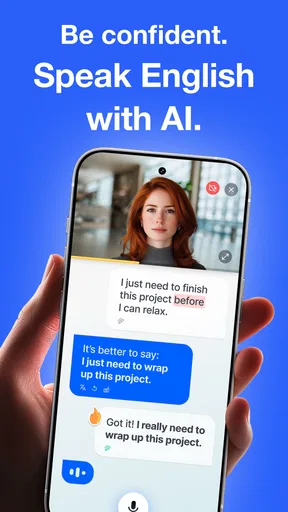
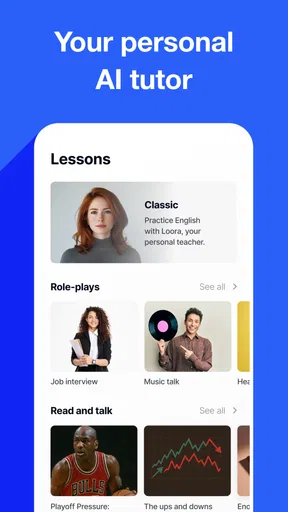
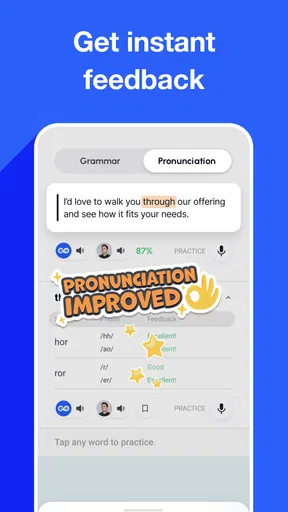
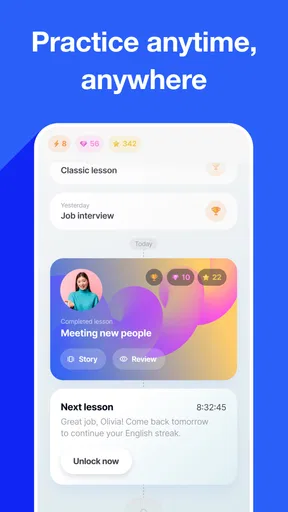
 Analysis by AppCompare
When I want to get more comfortable speaking English, I find that the hardest part is often starting a conversation, not learning another list of words. Speak English with Loora AI is built around that moment: it gives me a place to practise speaking with an AI tutor, rather than keeping all my practice on a page. It’s an education app from Loora AI, and its focus makes it a better fit for people who want to use English aloud than for learners mainly seeking grammar drills or written exercises.
Getting Started with Loora AI
First things first, setting up the app is a total breeze. You download it from the app store, and with just a few taps, you're all set. The interface is clean and intuitive, which is always a plus in my book. It’s like the app is saying, "Hey, I’m here to help, not to confuse you." Right from the get-go, you can tell that the focus is on simplicity.
Once you’re in, you’re greeted by a friendly AI tutor. Honestly, I was half-expecting a robotic voice, but Loora’s AI is surprisingly natural. It’s like having a conversation with a friend who just happens to be a language expert. The app guides you through a series of conversational exercises that are tailored to your skill level. So, whether you’re a beginner or more advanced, there’s something here for everyone.
Features that Shine
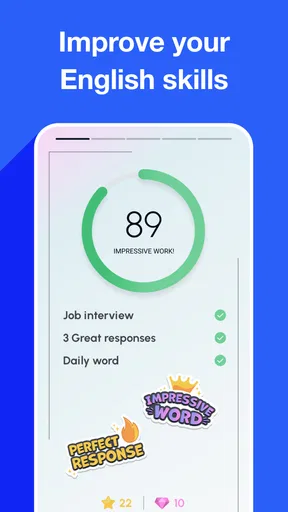
Now, let’s talk features. One of the coolest things about Speak English with Loora AI is the real-time feedback. As you speak, the app provides instant corrections and suggestions. This isn’t your typical "learn English" app where you just memorize phrases. Instead, you’re actively engaging and improving as you go.
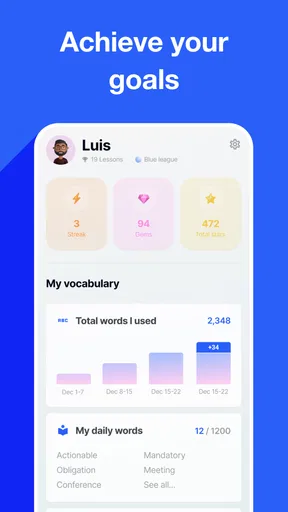
- Personalized Learning Paths: The app adapts to your progress, ensuring that you’re always challenged but never overwhelmed.
- Variety of Topics: From casual chit-chat to more formal conversations, Loora covers a wide range of topics. This keeps things fresh and interesting.
- Speech Recognition: The speech recognition technology is top-notch. It picks up on accents and nuances, which is crucial for non-native speakers like myself.
And let's not forget the interactive lessons. They’re designed to be engaging, with little quizzes and challenges sprinkled throughout. It’s a fun way to keep you on your toes and make sure what you’re learning sticks.
Why Loora AI Stands Out
In the sea of language learning apps, what makes Loora AI stand out? For me, it’s the conversational aspect. The app doesn’t just teach you words and phrases; it teaches you how to use them in real-life situations. I’ve found myself picking up on nuances and expressions that I wouldn’t have learned from a textbook.
Another thing that caught my attention is the community aspect. You can join groups and participate in discussions with other learners. It’s a great way to practice and also get tips from fellow users. Plus, it adds a social element to the learning process, which I’m all for.
Worth Reading Before You Choose

Baby Panda World Brings Quick Play to Modern Phones, but Its Game Library Feels Busy

ESPN’s Live Game View Makes Following Close Games Easier

QuizzLand Review: A Good Fit for Short Trivia Breaks, Not Every Player

Basketball Stars: Multiplayer Is Fast, but Can It Recover When Matches Go Wrong?

WEBTOON Turns Phone Updates Into a Better Reading Routine

Link to Windows Runs on Shared Habits, Not Social Feeds
Practice That Fits Around Real Life
The most useful way I’d work this kind of speaking practice into a day is to connect it to one situation I expect to face. Before a meeting, for example, I could practise introducing a point or asking someone to clarify a detail. Before travelling, I could rehearse explaining what I need. That gives a conversation a purpose, and it makes feedback easier to apply than a vague goal like “speak better.”
I’d also keep each session focused on one small improvement. If I notice that I pause when describing a past event, I can pay attention to that while speaking instead of trying to fix pronunciation, grammar, and vocabulary all at once. A short note after practice—one phrase I want to reuse and one correction I want to remember—can help turn a conversation into something I can carry into the next one.
This is especially handy for learners who understand English when reading or listening but hesitate when it’s their turn to talk. Speaking to an AI can lower the social pressure of making a mistake in front of a colleague or stranger. It doesn’t replace those conversations, but it can make the first attempt feel less daunting.
Where the Conversation Format Helps—and Where It Doesn’t
Compared with flashcard-focused language apps, Loora’s appeal is the chance to produce your own sentences rather than only recognise a correct answer. That distinction matters if your goal is to respond spontaneously. A textbook or structured grammar course may still be a better choice when you need a careful explanation of a rule, while a human tutor can offer personal judgement and the give-and-take of a real relationship. I see this app as speaking practice, not a complete substitute for either.
There is also a practical trade-off in relying on speech recognition. It can make speaking feel approachable and give you an immediate prompt to improve, but feedback from software is not the same as a human listener’s understanding of what you meant. If a correction seems unhelpful, I wouldn’t assume that every detail of my English is wrong. I’d repeat the sentence, try a simpler version, and use a teacher or trusted speaker for questions where context matters.
For beginners, a conversational format can feel demanding if they don’t yet have enough vocabulary to keep a turn going. I’d start with familiar subjects and short answers, then build toward longer explanations. More experienced speakers may get more out of the app by practising specific situations or focusing on phrases they tend to avoid, rather than expecting every session to reveal a major weakness.
Cost, Access, and the Value Question
The app is free to download, with in-app purchases listed from $14.99 to $119.99 per item. I’d treat that range as a reason to check the purchase options in the app before committing, rather than assuming every learner needs a paid option. The useful question is whether the speaking practice fits your routine and whether you want to keep using it—not whether a price alone promises fluency.
Its free access gives you a way to judge the basic experience before deciding whether to spend. If speaking aloud is your main obstacle, a tool that helps you practise regularly may be more valuable to you than another resource you rarely open. If you mainly want vocabulary lists, detailed grammar explanations, or a live conversation partner, the value equation changes: a different kind of learning resource may better match what you need.
Loora AI has an average rating of 4.9 from around 237,000 ratings, and it has passed 5 million installs. Those figures suggest that many people have tried it, but they can’t tell me whether its conversational style will suit a particular learner. I’d use the app myself for a little while and judge it by whether I’m speaking more willingly and remembering useful corrections.
Small Habits That Make Practice More Useful
One trade-off with any AI conversation is that it can be tempting to chase a smooth exchange instead of noticing what is changing in my speech. I’d slow down when a correction appears, say the revised phrase aloud, and then use it in a fresh sentence. That extra step is less entertaining than simply moving on, but it gives me a better chance of remembering the adjustment.
I’d also avoid treating a polished response as proof that I could use the same wording naturally in every setting. A casual reply and a workplace explanation call for different levels of formality. The range of conversation topics can help me practise switching contexts, but I still need to consider who I’m speaking to and what I’m trying to achieve.
For a realistic routine, imagine having ten quiet minutes before the day gets busy. I’d choose one upcoming conversation, practise opening it and explaining my main point, then finish by repeating one sentence that felt difficult. That is more actionable than opening the app without a goal, and it makes the practice easier to connect to a real conversation later.
Who Is Most Likely to Benefit?
I’d recommend trying it if you already know some English but freeze when you have to speak, or if you want a low-pressure way to rehearse conversations between lessons. It can also suit someone preparing for everyday situations—introductions, travel questions, or explaining an idea at work—who wants to practise phrasing before doing it in person.
I’d skip it, or pair it with something else, if your priority is writing, a systematic grammar syllabus, exam preparation with a fixed format, or nuanced feedback from a qualified person. Learners who dislike speaking to a device may also find the core activity less motivating than reading, watching lessons, or joining a class. That’s not a flaw so much as a mismatch between the app’s central idea and their preferred way to learn.
The app is rated for Everyone, and its current version is 2.14.1, with a minimum OS requirement of 7.1. It was released on March 24, 2024. Those details help set expectations about access, but the more important choice is whether spoken practice is the kind of learning you will actually return to.
Wrapping It Up
So, what’s the final verdict? If you’re serious about improving your English and want an app that’s engaging and effective, Speak English with Loora AI is definitely worth a try. It’s user-friendly, packed with features, and most importantly, it makes learning fun. I’ve enjoyed using it, and I think you will too.
It’s always refreshing to find an app that delivers on its promises and provides real value. Whether you’re preparing for a trip abroad, looking to advance in your career, or just want to chat more confidently with friends, Loora AI has got you covered. Happy learning!
Pros
- Easy-to-use interface for all ages.
- Real-time feedback on pronunciation.
- Customizable learning paths.
- Engaging and interactive lessons.
- Offline mode for learning anywhere.
Cons
- Limited free content available.
- Requires stable internet connection.
- No support for advanced learners.
- Some accents not fully supported.
- Occasional app crashes reported.
FAQs for Speak English with Loora AI
What is Speak English with Loora AI?
Speak English with Loora AI is an interactive language learning app designed to help users improve their English speaking skills. Utilizing advanced AI technology, the app provides personalized feedback and practice sessions. It's perfect for learners at any level, offering a convenient and engaging way to enhance communication abilities.
How does the AI technology work in the app?
The AI in Speak English with Loora AI analyzes your speech patterns, pronunciation, and fluency. It then provides real-time feedback to help you improve. The AI adapts to your learning pace, ensuring that the practice sessions are tailored to your specific needs, making learning efficient and effective.
Is the app suitable for beginners?
Yes, Speak English with Loora AI is designed for learners of all levels, including beginners. The app offers a range of beginner-friendly exercises and tutorials that gradually increase in complexity. This ensures that you can start from the basics and progressively improve your English speaking skills.
Are there any subscription fees for using the app?
Speak English with Loora AI offers both free and premium versions. The free version includes basic features, while the premium subscription provides access to advanced lessons, personalized feedback, and additional resources. Pricing details for the premium version can be found within the app or on the official website.
Can the app be used offline?
Currently, Speak English with Loora AI requires an internet connection to function effectively. This is necessary for the AI to process your speech and provide accurate feedback. However, the developers are exploring options for offline use in future updates, making it more accessible to users without constant internet access.


